Sandbox mode
You can learn to use the API safely with sandbox mode.
In sandbox mode, endpoints will validate the data you send with the request as normal, but will:
- return stable, canned responses that you can build reliable integration tests around
- do not process real personal data
- do not send any real emails or text messages
- are not billable
- share the same sandbox data that you see across the dashboard
Activate sandbox mode
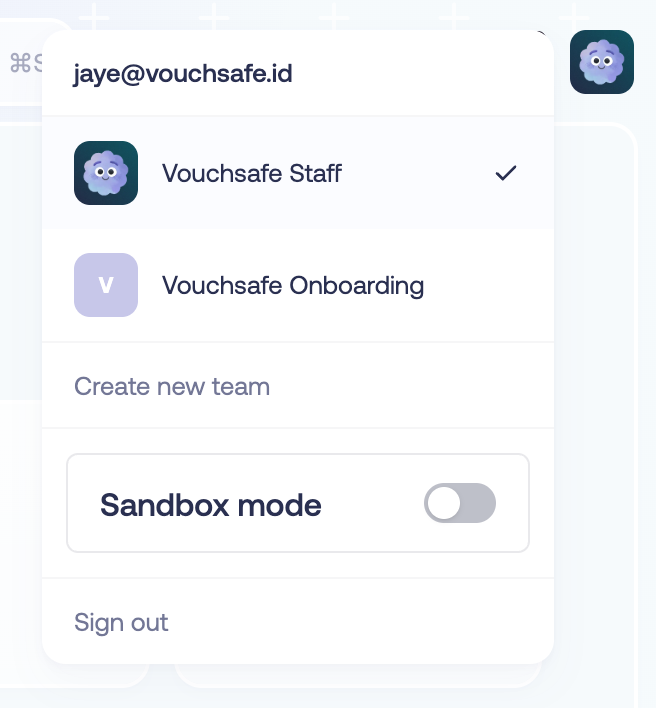
Go to the team switcher to activate sandbox mode in the dashboard.
Navigate to the API integration page and create a sandbox client secret.
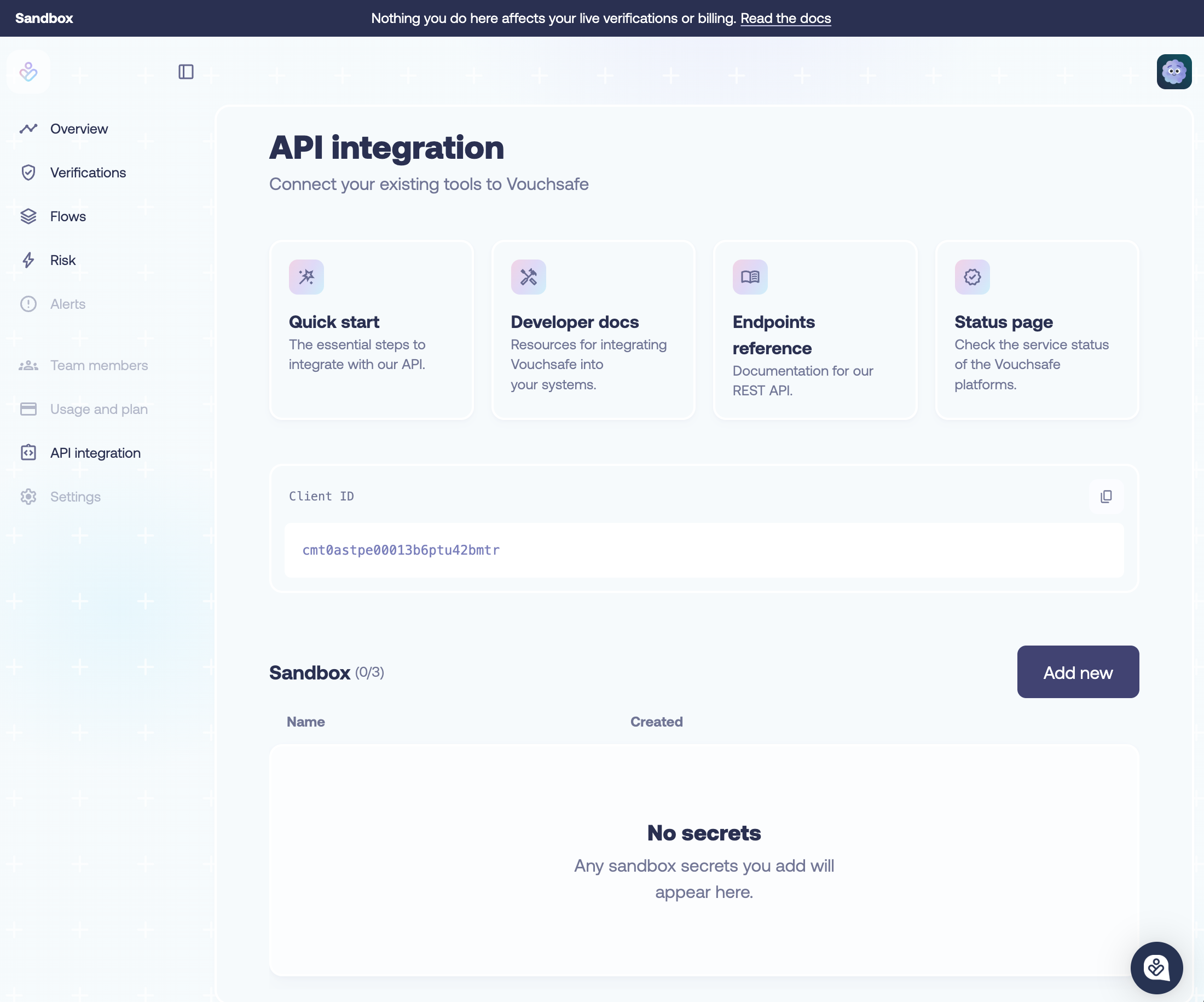
It will start with sandbox-. Then, you can call the API in exactly the same way.
Simulating different sandbox scenarios
Sandbox mode serves one set of examples that are shared across the API and the dashboard.
Every ID you get back from the API opens the same record in your sandbox dashboard, with the same evidence, checks and scores.
Risk
In sandbox mode, email picks the recommendation you get back.
| Recommendation | |
|---|---|
contains +reject | REJECT |
contains +review | REVIEW |
| anything else | CLEAR |
The response echoes your input and includes only the enrichments you requested.
Requested enrichments are shaped to match the outcome:
- CLEAR: all pass
- REVIEW: only the last requested enrichment fails
- REJECT: all fail
Example — Review risk check
Request:
curl -X POST https://app.vouchsafe.id/api/v2/risk \
  -H "Authorization: Bearer sandbox-your-token" \
  -F "first_name=Alex" \
  -F "last_name=Fenwick" \
  -F "email=alex+review@acme.test" \
  -F "date_of_birth=1990-01-01" \
  -F 'enrichments=["CREDIT_BUREAU","ONLINE_FOOTPRINT","AML"]' \
  -F 'address={"residence_number":"1","street":"Test Street","city":"London","postcode":"SW1A 2AA","country_code":"GB"}'
Response:
  {
    "first_name": "Alex",
    "last_name": "Fenwick",
    "email": "alex+review@acme.test",
    "risk_score": 41,
    "recommendation": "REVIEW",
    "fraud_signals": ["LOW_CROSS_TEAM_EMAIL_VELOCITY", "LOW_EMAIL_SCORE"],
    "billable": false
  }
This is a trimmed example. See the API reference for the complete schema.
To return a record you can open in the sandbox dashboard, use dwebb@email.com (CLEAR), jdoe@email.com (REVIEW), or eroberts@email.com (REJECT).
Alerts
The sandbox has two monitored accounts:
| ID | Name | Risk type | Status |
|---|---|---|---|
sl_sandbox_001 | Emily Roberts | sanction | New |
sl_sandbox_002 | Jane Doe | pep | Acknowledged |
You can retrieve them with these IDs at the ListAccounts and GetAccountDetail endpoints.
Each account has already raised one alert, and can deliver it to you on demand. See alert webhooks.
Verify
You can simulate retrieving different kinds of verification results by providing these IDs at the GetVerification endpoint:
| ID | Name | Status | Outcome |
|---|---|---|---|
| 111 | Jane Doe | In Progress | New case with everything to do. Nothing submitted yet. |
| 222 | Emily Roberts | Processing | All evidence submitted. Her bank statement is a copy rather than an original, so the results are still being checked. |
| 333 | David Webb | Verified | All checks passed automatically: selfie, passport and energy bill |
| 444 | Emily Roberts | Needs Review | She has applied as “Em” from a disposable email address. Her name matches neither document, and an AML check returns a match. |
| 555 | Emily Roberts | In progress | Partial completion. Address is confirmed but only the vouch step remains. |
| 666 | Emily Roberts | Verified | Identity established by a vouch. |
| 777 | David Webb | Locked out | The liveness selfie does not match the face on the passport. |
| 888 | Emily Roberts | Verified | An address-only check done with two supporting documents. |
| 999 | Emily Roberts | In progress | Vouch still outstanding - the referee locked themselves out on their own selfie. |
Example - Verified
Request:
curl -X GET https://app.vouchsafe.id/api/v1/verifications/333 \
  -H "Authorization: Bearer sandbox-your-token"
Response:
{
  "id": "333",
  "status": "Verified",
  "created_at": "2026-08-18T09:01:00.000Z",
  "expires_at": "2026-08-25T09:01:00.000Z",
  "email": "dwebb@email.com",
  "claim_details": {
    "first_name": "DAVID CHRISTOPHER",
    "last_name": "WEBB",
    "date_of_birth": "1996-12-12",
    "address": {
      "residence_number": "221B",
      "street": "Baker Street",
      "city": "London",
      "postcode": "NW1 6XE",
      "country_code": "GB"
    }
  },
  "checks": [
    {
      "step": "step_identity",
      "outcome": "pass",
      "method": "photo_id",
      "evidence_type": "passport",
      "extracted_details": {
        "document_number": "999217495",
        "expiration_date": "2031-01-01",
        "issuing_country": "GBR"
      },
      "validations": {
        "names_consistent": { "status": "pass" },
        "dates_of_birth_consistent": { "status": "pass" },
        "has_not_expired": { "status": "pass" }
      }
    },
    {
      "step": "video_selfie",
      "outcome": "pass",
      "total_attempts": 1,
      "validations": {
        "liveness_check": { "status": "pass", "score": 89 },
        "face_match": { "status": "pass" }
      }
    }
  ],
  "enrichments": [
    { "check": "radar", "outcome": "pass" }
  ]
}
This is a trimmed example. It is missing the rest of enrichments. See the API reference for the complete schema.
Postcode lookup
The postcode you send picks which addresses you get back.
Any other postcode you pass in is refused.
| Postcode | Addresses | Where | Whose address is there |
|---|---|---|---|
SW1A 2AA | 1 | Downing Street, London | Jane Doe |
NW1 6XE | 12 | Baker Street, London | David Webb |
AB11 6BH | 21 | Union Street, Aberdeen | Emily Roberts |
Example - A street with several addresses
Request:
curl -X GET "https://app.vouchsafe.id/api/v1/smart-lookups/postcode?postcode=NW1+6XE" \
  -H "Authorization: Bearer sandbox-your-token"
Response:
{
  "addresses": [
    "215, Baker Street, London",
    "221B, Baker Street, London",
    "Flat 1-86 219, Baker Street, London"
  ],
  "addresses_formatted": [
    {
      "residence_number": "215",
      "street": "Baker Street",
      "city": "London",
      "postcode": "NW1 6XE",
      "country": "United Kingdom",
      "country_code": "GB"
    },
    {
      "residence_number": "221B",
      "street": "Baker Street",
      "city": "London",
      "postcode": "NW1 6XE",
      "country": "United Kingdom",
      "country_code": "GB"
    },
    {
      "residence_number": "Flat 1-86 219",
      "street": "Baker Street",
      "city": "London",
      "postcode": "NW1 6XE",
      "country": "United Kingdom",
      "country_code": "GB"
    }
  ]
}
This is a trimmed example. The full response holds all 12 addresses at the postcode. See the API reference for the complete schema.
Webhooks
Live webhooks arrive on their own: verifications send them as they progress, and alerts arrive when screening finds something new. Sandbox records are examples that never change, so you trigger each webhook yourself with a single API call.
Each call delivers one webhook to the webhook_url you give. The response reports how that went: payload is exactly what was delivered, response is your endpoint's reply, and error is why the delivery failed, if it did.
webhook_url must be an https address reachable from the public internet. To receive webhooks on your own machine, expose your local server through a tunnel (ngrok, for example) and use the tunnel's URL.
Verification webhooks
POST /v1/verifications/{id}/webhooks delivers one of that verification's webhooks.
Each verification only sends the events it would really send, and every one carries that verification's own ID.
| ID | Status | Sends |
|---|---|---|
| 111 | In progress | Created, Expired |
| 222 | Processing | Created, UserCompleted, ManuallyReviewed |
| 333 | Verified | Created, Verified |
| 444 | Needs review | Created, Refused |
| 555 | Awaiting a vouch | Created, UserCompleted, Expired |
| 666 | Verified by vouch | Created, UserCompleted, Verified |
| 777 | Locked out | Created |
| 888 | Address only | Created, Verified |
| 999 | Awaiting a vouch | Created, UserCompleted, Expired |
Asking for an event a verification never sends is refused, and the refusal names the ones it does.
Example - Send a Verified webhook
Request:
curl -X POST https://app.vouchsafe.id/api/v1/verifications/333/webhooks \
  -H "Authorization: Bearer sandbox-your-token" \
  -H "Content-Type: application/json" \
  -d '{"webhook_url": "https://example.com/webhooks", "event": "Verified"}'
Response:
{
  "event": "Verified",
  "webhook_url": "https://example.com/webhooks",
  "payload": {
    "event": "Verified",
    "id": "333",
    "status": "Verified",
    "created_at": "2026-08-19T09:01:00.000Z",
    "expires_at": "2026-08-26T09:01:00.000Z",
    "email": "dwebb@email.com"
  },
  "response": { "status_code": 200, "body": "OK" },
  "error": null
}
This is a trimmed example. The full payload carries every field of the verification record.
One call sends one webhook, so to walk a verification through its whole life, call once per event.
Alert webhooks
POST /v1/alerts/accounts/{id}/webhooks delivers the alert that account has raised. Both monitored accounts can send theirs.
Example - Send an alert webhook
Request:
curl -X POST https://app.vouchsafe.id/api/v1/alerts/accounts/sl_sandbox_001/webhooks \
  -H "Authorization: Bearer sandbox-your-token" \
  -H "Content-Type: application/json" \
  -d '{"webhook_url": "https://example.com/webhooks"}'
Response:
{
  "event": "Alert",
  "webhook_url": "https://example.com/webhooks",
  "payload": {
    "event": "Alert",
    "alertId": "alert_sandbox_1",
    "smartLookupId": "sl_sandbox_001"
  },
  "response": { "status_code": 200, "body": "OK" },
  "error": null
}
Limitations
Sandbox responses are examples, not real lookups, verifications or alerts. They appear in your sandbox dashboard, never in live mode.
This doesn’t touch real data. If you want to get a feel for real match rates, get in touch with us to run a data pilot instead.